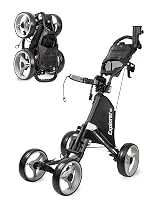
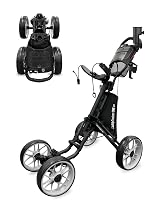
Best Remote Golf Push Carts: How to Choose
The best remote golf push cart for most walkers is the Motocaddy M7 Remote Electric Caddy, because its remote works from 150+ feet, its battery covers up to 27 holes and it folds compactly. Pick the MGI Zip Navigator for 36 holes and tougher terrain, or the KVV Remote for the smallest folded footprint.
On this page (11 sections)
- What does a remote golf push cart actually do for you?
- How far should the remote work from your hand?
- How many holes should the battery cover?
- How small does the cart need to fold?
- Why does cart weight matter more than you think?
- Which wheels and controls handle hills and rough ground?
- Which remote cart suits each type of golfer?
- How do the three remote carts compare?
- What should you skip when shopping for a remote cart?
- How should you set up and care for a remote cart?
- What is the best remote golf push cart for you?
The best remote golf push cart for most walkers is the Motocaddy M7 Remote Electric Caddy. It steers from up to 150+ feet away, runs up to 27 holes on a charge and folds down for the trunk.
A remote cart takes the pushing out of your round, but the remote, battery and folded size decide whether it suits your course and your car. This guide explains what each number means and which of the three carts fits which walker.
What does a remote golf push cart actually do for you?
A remote golf push cart is a motorized cart you steer with a handset instead of pushing from the handle. It carries your bag and follows your commands, so you walk the course without leaning into a manual cart for 18 holes.
That changes how you move around the fairway. You can send the cart ahead along the path, then walk to your ball with both hands free.
The remote usually offers forward, left, right and reverse controls, plus pause and resume, so you can stop the cart while you take a shot.
The trade-off is that you now manage a battery and a handset. A remote cart needs charging before the round, and the handset needs to stay in reach or clipped to the cart.
You also need to keep the cart in sight so you can steer it around bunkers, trees and other players.
Weight matters too. A remote cart carries a motor and battery, so it is heavier than a basic push cart.
The Motocaddy M7 is 16 lb, while the MGI Zip Navigator is 37.25 lb with the battery fitted. Check that you can lift your pick into the car after a round when you are tired.
Rule: buy a remote cart only if hands-free steering and less pushing matter more to you than a light, simple cart.
How far should the remote work from your hand?
Look for a remote that reaches at least 100 feet, because that covers most walks from cart to ball on a typical hole. The Motocaddy M7 remote works from up to 150+ feet, which gives you room to park the cart behind you and still send it forward.
Distance matters most on wide fairways and when you cut across to a green. A short-range remote forces you to walk back to the cart and steer from close in, which defeats the point of going hands-free.
The MGI Zip Navigator offers 360° remote control, so you can steer it in any direction rather than just forward and back. That helps when the cart needs to turn out of a tight spot or reverse away from a path edge.
Consider the handset itself as well. Buttons for forward, left, right and reverse should be easy to press without looking down for long.
A pause and resume control lets you stop the cart quickly when someone walks into its path.
Rule: choose a remote rated at 100 feet or more; go longer if your course has wide fairways or you like to send the cart ahead.
How many holes should the battery cover?
Pick a battery rated for at least 18 holes, and go to 27 or 36 if your course is hilly or you play more than one round in a day. The Motocaddy M7 lithium battery covers up to 27 holes on a charge, while the MGI Zip Navigator covers up to 36.
Battery range shrinks when the cart works harder. Hills, soft ground and a heavy bag all draw more power.
If your home course climbs and turns, a 27-hole or 36-hole rating gives you a buffer over a flat 18.
The KVV Remote is rated at 18 holes+, so it covers a standard round but has the least spare capacity of the three. That suits a flat course and a single round, not a long day with two loops.
Charging routine matters as much as the rating. The MGI uses a removable Click & Go lithium battery with plug-and-play charging and a USB port for your phone or GPS.
The Motocaddy M7 comes with a long-lasting battery and charger and a USB charging cable. Plan where you will plug in after each round so the cart is ready next time.
Rule: match the battery to your course, not just to 18 holes; buy 27 or 36 holes if your ground is hilly.
How small does the cart need to fold?
Measure your trunk opening and your storage space before you pick, because folded size varies a lot between remote carts. The KVV Remote folds to 17.5 x 18.7 x 22 in, making it the smallest folded package here and the easiest to slot into a small car.
The Motocaddy M7 folds into a compact package with a simple mechanism, and its 16 lb weight makes it the lightest of the three to lift. That combination suits a walker who loads and unloads the cart alone.
The MGI Zip Navigator uses Zip Fold Technology with a dual-action fold, and its rear wheels tuck inward to create a smaller footprint. That helps with vehicle fit, though it is the heaviest cart here at 37.25 lb with the battery.
If folding is your main worry, our guide to how to fold a golf push cart walks through the steps so you can judge how much space each design saves. A cart that folds small but takes three steps to set up may not save you time on the first tee.
Rule: measure your trunk first, then choose the smallest folded size you can lift comfortably when the bag is off.
Why does cart weight matter more than you think?
Weight decides whether you can get the cart in and out of the car without help. The Motocaddy M7 is 16 lb, the KVV Remote is 27.9 lb and the MGI Zip Navigator is 37.25 lb with the battery fitted.
The gap between 16 lb and 37.25 lb is a real difference at the end of a round. If you drive a hatchback with a high lip or store the cart upstairs, the lighter cart is easier to manage.
If someone else loads the car or you keep the cart in a garage at ground level, the weight matters less.
Battery design also changes the lifting. The MGI battery is removable, so you can take it off before lifting the cart and cut several pounds from the load.
The Motocaddy battery is removable too, so you can charge it off the cart.
Heavier carts tend to feel more planted on slopes. The MGI's 37.25 lb and its fifth stabilizer wheel give it a steady base on uneven ground.
The trade-off is that you pay for that stability when lifting it.
Rule: pick the lightest cart you can lift with one hand after 18 holes; only go heavier when stability on hills is the bigger need.
Which wheels and controls handle hills and rough ground?
For hilly or uneven courses, look for all-terrain tires, downhill control and a stabilizer wheel. The Motocaddy M7 has all-terrain tires, anti-tip rear wheels, automatic downhill control and 9 speeds, so it holds its pace on descents.
The MGI Zip Navigator goes further for rough ground. It has dual oversized all-terrain swiveling front wheels, all-terrain tread rear wheels and a rear stabilizer as a fifth wheel.
It also adds Downhill Cruise Control and gyroscope straight tracking, which keeps the cart running in a straight line on slopes.
Speed range tells you how finely you can match the cart to your walking pace. The MGI offers 1 to 20 speeds, while the Motocaddy M7 has 9 and the KVV has 1 to 9.
More settings help on long, gradual climbs where a big jump between speeds feels jerky.
The KVV Remote adds a 360° rotating front wheel and a straight line tracker, plus two training wheels for balance. That suits flatter, mixed ground and tighter turns more than steep descents.
For more options on four-wheel stability, see our roundup of the best 4 wheel golf push cart picks.
Rule: buy downhill control and a stabilizer if your course has real slopes; a flat course can do with fewer speed settings.
Which remote cart suits each type of golfer?
The Motocaddy M7 is the best remote golf push cart for most walkers because it balances remote range, battery life and weight. Its 150+ foot remote, 27-hole battery and 16 lb frame cover a normal 18-hole round without fuss, and it comes with a device cradle, drink holder, umbrella holder and scorecard holder.
The MGI Zip Navigator is the pick for long rounds and rough terrain. Its 36-hole battery, 20 speeds, fifth wheel and downhill cruise control suit hilly courses and players who walk two loops in a day.
The extra weight is the price of that stability.
The KVV Remote is the pick for small trunks. Its 17.5 x 18.7 x 22 in folded size, 360° front wheel and manual mode backup suit a compact car and a flat course.
Its 18-hole+ battery has less spare range than the other two.
If you want a lighter option without a motor, our guide to the best golf push cart for seniors covers carts built for easier walking. For the full picture on powered steering, read how to choose electric golf push carts with remote control.
Rule: name your main need first (range, battery, folded size or hill control), then buy the cart that wins on that need.
How do the three remote carts compare?
All three carts steer by remote, but they differ on the numbers that decide a purchase. Use this table to match the specs to your course and your car.
| Feature | Motocaddy M7 | MGI Zip Navigator | KVV Remote |
|---|---|---|---|
| Remote range | 150+ ft | 360° control | |
| Battery | Up to 27 holes | Up to 36 holes | 18 holes+ |
| Speed settings | 9 | 1-20 | 1-9 |
| Weight | 16 lb | 37.25 lb with battery | 27.9 lb |
| Folded size | Compact | Zip Fold, wheels tuck in | 17.5 x 18.7 x 22 in |
| Hill control | Automatic downhill control | Downhill Cruise Control, fifth wheel | Straight line tracker, training wheels |
| Manual mode | No | No | Yes |
The M7 wins on remote range and weight. The Zip Navigator wins on battery, speed range and hill stability.
The KVV wins on folded size and the manual backup.
Rule: compare the two or three specs that matter to your round, and ignore the rest; every cart here steers by remote.
What should you skip when shopping for a remote cart?
Skip features you will not use, and spend on the remote range and battery you need. A 20-speed control is only useful if your course has long climbs; on flat ground, a 9-speed cart steers just as well.
Skip a heavier cart if you load the car alone. The MGI's 37.25 lb buys stability, but only if you can lift it after a round.
If lifting is the problem, the 16 lb Motocaddy M7 makes more sense.
Skip the smallest folded size if your trunk is roomy. The KVV's compact fold helps in a small car, but its 18-hole+ battery leaves less spare range than the other two.
Pick it for space, not for long days.
Skip a remote cart entirely if you like the feel of pushing. A manual cart is lighter, needs no charging and costs less.
Remote carts suit walkers who want hands-free steering and less strain.
Rule: pay for the one feature that fixes your biggest problem, and skip the extras that only look good on paper.
How should you set up and care for a remote cart?
Charge the battery after every round and store the cart folded and dry. A full charge before each round keeps the remote and motor working at their rated range.
Check the remote battery too. A handset that runs low mid-round leaves you steering by handle or pushing.
Keep spare batteries or a charging routine for the handset as well as the cart battery.
Clean the wheels and the frame after wet rounds. Mud on the tread reduces grip on slopes, and grit in the folding joints makes setup harder.
Wipe the remote dry and keep it out of the rain when you can.
Store the cart with the battery removed if your model allows it. That protects the battery from heat in a garage and makes the folded cart lighter to move.
The MGI's removable battery and the KVV's manual mode both give you options when power runs low.
Rule: charge after every round, dry the cart before folding and keep the remote out of the rain.
What is the best remote golf push cart for you?
The best remote golf push cart for most walkers is the Motocaddy M7 Remote Electric Caddy. Pick it for a 150+ foot remote, up to 27 holes per charge, automatic downhill control and a 16 lb frame that is easy to lift.
Pick the MGI Zip Navigator if your course is hilly or you walk long days; its 36-hole battery, 1-20 speeds and fifth wheel are built for that. Pick the KVV Remote if your trunk is small; its 17.5 x 18.7 x 22 in fold and manual mode suit tight storage and flat ground.
Name your main need first, then buy the cart that wins on it. That is how you end up with the best remote golf push cart for your round rather than the one with the longest feature list.
Frequently asked questions
What should I check first when buying a remote golf push cart?
Check remote range and battery holes first, since those decide whether you can steer from across the fairway and finish 18 without a recharge. Then weigh folded size against your trunk and storage space.
How far does a remote golf cart remote work?
Remote ranges vary by model. The Motocaddy M7 remote works from up to 150+ feet, while the MGI Zip Navigator offers 360° remote control.
Buy for the distance you actually walk from the cart.
How many holes should a remote golf push cart battery last?
Look for at least 18 holes on a charge. The KVV is rated at 18 holes+, the Motocaddy M7 at up to 27 holes and the MGI Zip Navigator at up to 36 holes.
Extra range helps on hilly courses and long practice rounds.
Is a remote golf push cart heavier than a manual push cart?
Yes. Remote carts carry a motor and battery, so they weigh more than a basic push cart.
The Motocaddy M7 is 16 lb, the KVV is 27.9 lb and the MGI Zip Navigator is 37.25 lb with the battery fitted.
Do remote golf carts have a manual mode?
Some do. The KVV Remote switches to manual mode when the battery runs low or the ground suits it.
The Motocaddy M7 and MGI Zip Navigator are steered by remote or handle controls rather than a manual push mode.