Electric Golf Push Carts with Remote Control: A Buyer Guide
A remote control turns a motorized cart into a walk-along caddie you steer from several paces away. Buy for the steering range and speed count you'll actually use, then match folding size, battery holes, weight and brakes to your car and your course.
On this page (7 sections)
- What does a remote control add to an electric golf cart?
- How far and how fast should the remote steer?
- Which folding size and weight fit your car and your walk?
- How much battery do you need for 18 holes?
- How do braking and downhill control affect safety?
- Which accessories and storage come in the box?
- Which electric golf push cart with remote control should you buy?
An electric golf cart with a remote control lets you walk the course with your hands free and your clubs following behind. The remote is the feature you'll notice most, but the cart's folding size, battery life and braking decide whether it earns its spot in your trunk.
This guide covers what the remote actually does, how to judge steering range and speed settings, and which details matter when you compare electric golf push carts with remote control. Three models show how the choices play out in practice.
What does a remote control add to an electric golf cart?
The remote lets you send the cart ahead or bring it back without touching the handle. You walk with an empty hand, steer around bunkers and greens, and stop the cart when you reach your ball.
On a standard motorized cart, you hold a handle and guide it. A remote cart changes that relationship.
You can walk at your own pace while the cart follows a line you set with a thumbstick or buttons.
Motocaddy's M7 remote offers forward, left, right and reverse controls plus pause and resume. That set covers the moves you need around a green, a tee box or a tight path between trees.
The trade-off is attention. A remote cart needs steering and a watchful eye on slopes.
You are still responsible for where it goes, so a cart that responds predictably matters more than one with the longest feature list.
How the remote changes your walk
With a remote cart, your hands carry a scorecard, a drink or nothing at all. The motor takes the pushing load off your shoulders and arms across 18 holes.
That is the main reason golfers look at these carts. The walk stays the same length, but the physical work shifts to the motor and battery.
A remote also helps on holes where pushing a loaded cart uphill feels like a chore. You can walk beside or behind the cart and let it climb.
The catch is that you can't lean on the handle for balance on a steep slope. Plan your footing as if you were carrying a light bag, and keep one hand ready for the remote.
When a handle cart makes more sense
A remote cart adds cost and electronics. If you play a few times a month on flat courses, a plain 4 wheel golf push cart gives you stability and simple control for far less money.
Remote carts suit regular walkers who want the motor to do the work. A handle-controlled electric cart sits between the two: motorized, but steered by hand at the handle.
Think about your course before you decide. Hilly layouts reward good downhill control; flat, open courses reward a responsive remote and a light cart.
How far and how fast should the remote steer?
Look for a remote that reaches well past the length of a green and enough speed settings to match your walking pace. Range and speed count are the two numbers that shape daily use more than any other remote feature.
Motocaddy rates its M7 remote for operation from up to 150+ feet. That is plenty to park the cart beyond the green while you putt, or to send it down a fairway path while you walk.
Not every maker publishes a range, so compare what you can. A remote with a short working distance forces you to stay close, which defeats part of the point.
Speed settings matter for the same reason. The MGI Zip Navigator offers variable speed control from 1 to 20.
Motocaddy lists 9 speeds for the M7. KVV uses speeds from 1 to 9.
A wider speed range helps you match a slow walk on a crowded hole and a brisker pace on an empty fairway. Pick a cart with at least 9 speeds unless you walk the same pace every round.
Speed settings and walking pace
A speed dial or display that shows the level helps you return to a known pace. The MGI Zip Navigator puts variable speed control, battery level and distance mode on a bright digital display in its top box.
Distance mode is useful when you want the cart to travel a set stretch without holding the remote the whole time. You set the distance, send the cart, then walk to meet it.
Fewer speeds aren't automatically worse. A 9-speed cart with well-spaced levels can feel smoother than a 20-speed cart with tiny steps.
The question is whether the lowest setting is slow enough for a crowded tee and the top setting keeps up with your normal walk.
Steering and turning behavior
Remote controls usually offer left and right turns plus reverse. Reverse matters more than it sounds: you'll use it to back out of a tight spot or correct a line without walking around the cart.
The KVV cart adds a front wheel that rotates 360 degrees, which helps with tight turns and navigation. That design gives you more steering freedom when the cart needs to change direction in a small space.
Training wheels and a straight-line tracker on the KVV add balance and a steadier line on uneven ground. Those features help newer users keep the cart tracking true while they learn the remote.
Which folding size and weight fit your car and your walk?
Measure your trunk opening first, then compare folded dimensions and total weight. A compact fold is the difference between a cart you use weekly and one that stays in the garage.
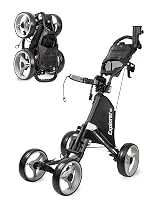
The KVV folds to 17.5 x 18.7 x 22 inches, the smallest folded size among these three. That makes it the easiest to slot into a small trunk or a corner at home.
The MGI Zip Navigator uses a one-piece Zip folding frame that the maker calls 12 percent lighter and 25 percent smaller than its earlier design. Its folded size is 27.55 x 18.5 x 16.5 inches with the rear wheels reversed on the axle.
Weight tells the other half of the story. The MGI Zip Navigator weighs 35 lb with the battery.
The KVV weighs 27.9 lb. Motocaddy lists the M7 at 16 lb, which makes it the lightest of the three to lift into a car.
If you lift the cart into a trunk after every round, weight should lead your shortlist. A 35 lb cart is fine with a ramp or a low load floor, but it is a chore to hoist into a high SUV.
How to measure your trunk for a folding cart
Open the trunk and measure the narrowest part of the opening, not just the floor. A cart can fit the floor space and still catch on the lip or a strut.
Then measure depth and height with the trunk lid closed. Leave a little room for a golf bag, shoes and whatever else rides with you.
Check the folded dimensions of the cart against all three figures. If the cart folds with wheels removed or reversed, use that figure, since that's how you'll store it.
Weight and lifting
A lighter cart is easier on your back at the start and end of a round. It also matters if you park far from the clubhouse or carry the cart up steps.
A heavier cart can still be the right pick if it stays assembled in a garage or shed. In that case, folded size matters less than how stable it feels on the course.
Weigh the lifting you'll actually do. A 16 lb cart you lift twice a week beats a 35 lb cart you avoid using.
Folding steps and setup time
A simple fold saves time before and after every round. The MGI Zip Navigator's one-piece frame is designed for quick setup to and from the course.
Motocaddy describes a simple folding mechanism on the M7. The KVV also folds down for storage.
If folding feels fussy, watch our how to fold a golf push cart walkthrough before you buy. A cart that takes two minutes to set up will test your patience on a cold morning.
How much battery do you need for 18 holes?
Buy a cart rated for at least 18 holes on one charge, with a bit in reserve for hills, a slow round or a second nine. Battery capacity and charging design decide whether the cart finishes the round with you.
The MGI Zip Navigator ships with a 36-hole battery. That gives you two rounds of rated capacity, which covers a long course or a weekend double.
Motocaddy lists up to 27 holes for the M7's compact lithium battery. KVV rates its rechargeable lithium battery at 18 holes or more.
Rated holes are a guide, not a promise. Uphill holes, wet grass and a heavy bag all draw more power.
Treat a 27-hole rating as about 18 real holes on a hilly course, and a 36-hole rating as comfortable for most rounds.
Charging and battery handling
MGI uses a Click and Go battery that locks in vertically with a lift handle. The charging port is color-coded red and black, and the charger shows green when full and red while charging.
That color coding removes guesswork. You plug in, watch the light, and know when the battery is ready.
The MGI Signature Series Power Bundle adds gear to keep the remote and caddie charged on the go. If you play back-to-back days, a second charging option is worth having.
Battery life on the course
Watch the battery level as you play. The MGI display shows battery level alongside speed and distance mode.
A visible gauge helps you plan the last few holes.
If the battery runs low, some carts offer a manual fallback. The KVV has a dual-mode design, so you can switch to manual mode when the battery is low or the ground calls for it.
Not every remote cart offers that. If manual backup matters, put it on your must-have list.
How do braking and downhill control affect safety?
Downhill control is the feature that keeps a remote cart from running away on a slope. Motocaddy lists automatic downhill control on the M7, and anti-tip rear wheels add stability.
A loaded cart rolling downhill with no braking is a hazard to you, other players and the cart itself. Automatic downhill control holds a steady speed so the cart doesn't accelerate past your walk.
The MGI Zip Navigator uses twin motors and an advanced electronics package. Twin motors give each rear wheel its own drive, which helps with tracking and turning.
KVV adds two training wheels and a straight-line tracker for extra balance. Those features help on uneven ground and give the cart a steadier line when you steer from a distance.
Check how the cart behaves on the steepest hole you play, not the flattest. A brake or downhill feature you never need is wasted; one you need and don't have is a problem.
Terrain and traction
All-terrain tread helps on wet grass, gravel paths and uneven ground. The MGI Zip Navigator uses all-terrain tread rear wheels for all conditions.
Motocaddy lists all-terrain tires and anti-tip rear wheels on the M7.
If your course has long gravel paths or you play in wet weather, tread matters more than speed count. A cart that slips loses its line and needs more steering.
Remote response and stopping
A remote that responds slowly makes every turn feel uncertain. Look for a pause or stop control you can reach without looking down.
Motocaddy's remote has pause and resume buttons, which let you stop the cart while you take a shot or check a lie. That is more useful than a single stop command you have to reset.
The MGI display and handle controls give you a second place to adjust speed. A backup set of controls on the cart itself helps if the remote battery or signal falters.
Which accessories and storage come in the box?
Count what's included before you compare prices, because accessories add up. A cart with holders for your phone, drink and umbrella saves you buying them later.
The MGI Zip Navigator bundle includes the cart plus a drink holder, GPS/phone holder, umbrella holder, Signature Series Power Bundle and a Signature Series golf towel. The towel is microfiber, measures 24 x 16 inches, and has a magnet and carabiner for attaching it to a club or cart.
Motocaddy lists a cell phone device cradle, drink holder, umbrella holder, scorecard holder, USB charging cable, battery and charger with the M7. That covers the practical extras most walkers want.
KVV includes a carry bag, drink holder, umbrella holder, remote control holder, battery, charger and an insulated cooler bag. The cooler bag is a useful addition for hot rounds.
Phone, drink and umbrella holders
A phone holder matters if you use a rangefinder app or track your round. The MGI holder is designed for a GPS device or phone.
Motocaddy includes a device cradle. KVV includes a remote holder as well as a drink and umbrella holder.
An umbrella holder extends your walking season into light rain and strong sun. Check that the holder fits the umbrella you own.
Charging ports and cables
The MGI Zip Navigator has a USB charging port under the top handle for phones and other devices. Motocaddy includes a USB charging cable with the M7.
A USB port on the cart keeps your phone charged through 18 holes. That is handy if you rely on a golf app for yardages or scoring.
Which electric golf push cart with remote control should you buy?
Pick the MGI Zip Navigator AT for most regular walkers. It has the highest score here because it pairs a 36-hole battery and 20 speed settings with a compact zip fold and a full accessory bundle.
Choose the Motocaddy M7 Remote if you want the lightest cart and the longest rated remote reach. At 16 lb with 9 speeds and automatic downhill control, it suits players who lift the cart in and out of a car every round.
Go with the KVV Remote Electric Push Cart if trunk space is tight or you want manual backup. Its 17.5-inch folded width and dual-mode design make it the easiest to store and the most forgiving when the battery runs low.
Our scores weigh specs, features and buyer feedback against what you're shopping for. For more comparisons in this category, see our roundup of the best electric golf caddy with remote.
If you're still deciding whether a remote cart is right for you at all, start with our guide to the best motorized golf push cart options and how they differ. Whichever model you choose, match the remote's range and speed settings to your course, and check the folded size against your trunk before you order.
Frequently asked questions
Can you push a remote electric golf cart like a normal cart?
Some can. The KVV cart has a dual-mode design, so you can switch to manual mode when the battery runs low or the terrain calls for it.
Not every remote cart offers this, so check the controls before you buy if manual backup matters to you.
How many holes should the battery last on a remote golf cart?
Aim for at least 18 holes from one charge. The MGI Zip Navigator ships with a 36-hole battery, Motocaddy lists up to 27 holes for the M7, and KVV rates its battery for 18 holes or more.
Round length, hills and cart weight all affect real-world range.
What size electric golf cart fits in a car trunk?
Check the folded dimensions rather than the unfolded ones. The KVV folds to 17.5 x 18.7 x 22 inches, the MGI Zip Navigator measures 27.55 x 18.5 x 16.5 inches folded with its rear wheels reversed, and the Motocaddy M7 uses a compact folding mechanism.
Measure your trunk opening first.
Is a remote control golf cart worth it over a standard push cart?
It is if you walk 18 holes often and want to take strain off your shoulders and back. The motor does the pushing, and the remote lets you steer without holding a handle.
A plain push cart costs less and needs no charging, so decide by how often you play.