MGI Zip Navigator Electric Golf Cart Review: Worth It? (November 2026)
The MGI Zip Navigator is a buy if you want a remote-controlled cart that walks with you over uneven ground and lasts 36 holes. Its stabilizer wheel, gyroscope straight tracking and Click & Go lithium battery make it the stronger of the two Navigator versions here.
On this page (8 sections)
The MGI Zip Navigator is worth buying if you walk hilly or uneven courses and want the cart to do the pushing. It pairs a remote control with a 36-hole lithium battery, and the all-terrain version adds a fifth stabilizer wheel plus gyroscope tracking that keep it steady when the ground isn't.
This mgi zip navigator review covers the all-terrain model first, because it's the one most golfers should buy. The older Navigator build is still here as a lighter-folding alternative, and we explain who it suits.
The MGI Zip Navigator at a glance
The Zip Navigator is a remote-control electric cart that follows you around the course rather than being pushed or pulled. Its job is to take the effort out of walking 18 holes so your legs and shoulders are fresher on the back nine.
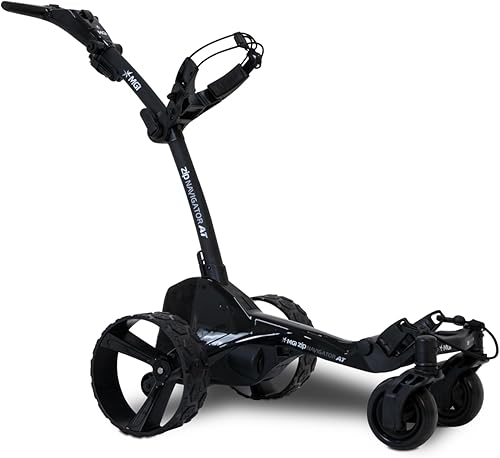
MGI Zip Navigator All Terrain Electric: Best for hilly courses and long rounds
- Remote control with variable speed 1–20
- 36-hole Click & Go lithium battery
- Dual swiveling all-terrain front wheels
- Rear stabilizer fifth wheel
- Zip Fold Technology
A remote electric cart built for terrain that pushes back. The fifth wheel, swiveling front wheels and gyroscope tracking keep it steady on slopes and sidehills.
Pros
- Fifth stabilizer wheel adds balance on hills
- Downhill Cruise Control keeps speed in check
- 36-hole battery covers two rounds on one charge
- USB port charges your phone or GPS
- 3-year warranty covers parts and battery
Cons
- 37.25 lb with battery is heavy to lift into a car
- Folding frame still takes up boot space
- Premium price band
The all-terrain version here adds the terrain hardware. Dual oversized swiveling front wheels, treaded rear wheels and a rear stabilizer fifth wheel give it a wide, planted base.
MGI's gyroscope straight tracking keeps it rolling in a line instead of drifting, and Downhill Cruise Control holds speed on descents so it doesn't run away from you.
The display on the handle shows speed, color-coded battery levels and distance tracking, with a total odometer and a resettable trip distance. A USB port lets you charge a phone or GPS while you play.
If you're still weighing up whether electric assist is for you at all, our guide to the best electric golf caddies with a remote puts this cart alongside its closest rivals.
Who the Zip Navigator suits
Buy it if you play courses with slopes, sidehills or rough lie unevenly and you're tired of shoving a cart up them. The stabilizer wheel and swiveling fronts are the features that earn their keep there.
It also suits golfers who walk 36 holes in a day or play several times a week. The 36-hole battery means one charge covers a full day, and the USB port keeps your phone and rangefinder topped up.
The remote matters most on open fairways. You can send the cart ahead while you line up a shot, then call it back when you're ready to move.
In tighter areas near greens and paths, switch to the handle for precision.
Skip it if you play a flat, walkable course and don't mind pushing. A manual cart costs far less and does the same job on level ground.
Also skip it if you drive a small car with a shallow boot and lifting 37 lb is a struggle, though the battery comes off to lighten the load.
Specs that matter in daily use
The numbers that change how the Zip Navigator feels round after round are weight, folded size, battery life and speed control. Everything else is comfort on top.
The cart weighs 37.25 lb with the battery in place and 31.08 lb without it. That's heavy enough that you'll notice it lifting into a car boot, but the removable battery takes the worst of it off.
The dual-action Zip Fold frame and rear wheels that tuck inward bring the folded footprint down so it fits more vehicles.
MGI rates the Click & Go lithium battery at up to 36 holes per charge. It's lightweight and removable, with simple plug-and-play charging and color-coded charge status.
A full round rarely empties it, so range anxiety isn't a real concern unless you're doing two loops in one day.
Speed runs on a 1–20 scale, which gives you fine control for walking pace and enough range for the cart to move ahead of you. The handle display tracks total distance and a resettable trip distance, so you can see how far you've walked.
MGI backs the cart with a 3-year warranty on all parts, including the lithium battery and charger, provided you register within 30 days of purchase. Spare parts ship free and MGI publishes DIY repair videos.
Setting up and folding the cart
Setup is a fold-and-click job rather than an assembly project. The Zip Fold frame uses a dual-action fold, so the cart opens into its walking position and collapses back down in one motion.
Start by fitting the rear wheels and checking they're locked in place. Clip the battery onto its mount using the lifting handle, then confirm the color-coded charge port shows a full charge before you leave home.
Attach your bag to the adjustable top support so it sits level.
Unfold the frame fully and check the stabilizer wheel is down and touching the ground before you power on. The fifth wheel only does its job when it's set correctly.
When you pack up, invert the rear wheels on the axle to shrink the footprint, then fold the frame. The smaller folded shape helps it slide into a boot or storage corner.
Charging is plug-and-play. Leave the battery on the cart or take it off to charge indoors.
A full charge after each round keeps the 36-hole range honest, and registering the cart within 30 days protects the warranty.
Care and storage between rounds
Keep the Zip Navigator working by charging after every round and cleaning the wheels and frame before storage. Electric carts that sit dirty and flat are the ones that let you down.
Wipe mud and grass from the treaded rear wheels and the swiveling fronts after wet rounds. Clumps of turf packed into the wheel wells can affect how the cart tracks and how freely the fronts turn.
A damp cloth and a soft brush handle most of it.
Check the battery contacts and the charge port for dirt. A clean connection charges reliably.
Store the battery at a moderate temperature rather than a freezing garage or a hot shed, and top it up during long gaps between rounds.
Inspect the stabilizer wheel and the folding joints for looseness. A quick check before each round catches a wobbly wheel before it becomes a problem mid-course.
Clean and dry the cart before folding it away. Storing it wet encourages corrosion on the metal parts.
A dry, covered spot keeps it ready for the next tee time.
Our guide to what a pull cart is in golf is useful if you're moving up from a manual cart and want to understand what changes with electric assist.
The trade-offs before you buy
The main trade-off is weight against capability. The all-terrain hardware that steadies the cart on hills also makes it heavier to lift and bulkier to store than a simple manual cart.
At 37.25 lb with the battery, it's not a one-handed lift into a high boot. Removing the battery helps, but you'll still want a firm grip and a bit of space at the car.
If you have a bad back or a small hatchback, measure the boot and try lifting something similar first.
The premium price band is the second consideration. You're paying for the remote, the 36-hole battery and the terrain aids.
On a flat course where a push cart rolls easily, those features add cost without adding much benefit.
The speed range of 1–20 is generous, but the top end isn't something you'll use often. Most walking is done in the lower half of the scale, where the fine control matters more than raw speed.
Finally, the folding frame still occupies space. It's compact for an all-terrain cart, but not as small as a basic push cart.
If storage is tight, that's worth weighing.
How the two Navigator models compare
The two Navigators here share a name and a 36-hole battery but differ in terrain hardware and speed control. The all-terrain model is the one to buy for most golfers, and the older build suits a narrower set of needs.
MGI Zip Navigator All Terrain Electric Golf
This version folds to 27.55 x 18.5 x 16.5 in with the rear wheels inverted, which is smaller than the all-terrain model. It weighs 30.91 lb without the battery and runs on twin 230-watt motors.
Its speed control runs 1–9 rather than 1–20. The handle display shows four color-coded battery levels and two resettable distances, plus a USB port under the top handle.
The adjustable T-bar handle and independent top bag support let you set the fit.
What it gives up against the all-terrain model is the stabilizer wheel, gyroscope straight tracking and Downhill Cruise Control. On flat courses those matter less.
On hills they matter a lot, which is why this cart scores lower here.
Choose it if your course is mostly level and boot space is the deciding factor. It's also the lighter cart to lift when the battery is out.
Manual carts and other electric options
If you're not ready for a remote cart, a four-wheel push cart spreads the load and rolls more steadily than a two-wheel pull cart. Our roundup of the best 4 wheel golf push cart picks the steadiest manual options.
On a tighter budget, a basic electric cart gives you powered walking without the remote and terrain extras. Our guide to the best budget electric golf push cart covers the models worth a look.
The choice comes down to how much terrain you face. A manual cart on a flat course is fine.
Add hills, and the Zip Navigator's stabilizer wheel and gyroscope tracking earn their price.
Verdict: should you buy the MGI Zip Navigator?
Buy the MGI Zip Navigator all-terrain model if you walk hilly or uneven courses and want a remote cart that stays steady. Its fifth stabilizer wheel, gyroscope straight tracking and Downhill Cruise Control are what separate it from cheaper electric carts.
It's also the right pick for golfers who play 36 holes in a day or want to charge a phone and GPS on the move. The 36-hole battery and USB port cover both.
Pick the older Navigator build instead if your course is flat and boot space is tight. It folds smaller and weighs slightly less without the battery, but its 1–9 speed range and missing terrain aids make it the weaker all-rounder.
Skip both if you play a short, flat course and don't mind pushing. A manual cart costs less and does the same job on level ground.
This mgi zip navigator review lands on the all-terrain model as the better buy for most walkers. Check the folded size against your car and the weight against your lifting comfort before you order, then register the cart within 30 days to lock in the 3-year warranty.
Frequently asked questions
How far will the MGI Zip Navigator go on one charge?
MGI rates the Click & Go lithium battery at up to 36 holes per charge, which is two full rounds. Course hills, wet grass and battery age all pull that number down, so charge it after every round if you play 36 in a day.
Does the Zip Navigator work without the remote?
Yes. You can steer it from the handle with the same speed control, which gives you more precision in tight spots around greens and cart paths.
The remote is for hands-free walking on open fairways.
Is the MGI Zip Navigator heavy to lift into a car?
It weighs 37.25 lb with the battery fitted. The battery comes off, which drops it to 31.08 lb, and the Zip Fold frame folds down for transport.
Lifting it into a high SUV boot still takes some effort.
What does the MGI warranty cover?
MGI offers a 3-year manufacturer warranty on all parts, including the lithium battery and charger, once you register within 30 days of purchase. Spare parts ship at no charge, and MGI provides DIY repair videos for common fixes.
How do the two Zip Navigator models differ?
The B0CTLQFN7C version adds a fifth stabilizer wheel, gyroscope straight tracking, Downhill Cruise Control and a 1–20 speed range. The B07S7T4FNS model folds smaller and runs a 1–9 speed range without those terrain aids.